KPI Definition (v8.xx)
The KPI Definition can be created in the Create Context Menu.

KPI Definitions are global for all projects. There can be more than one.
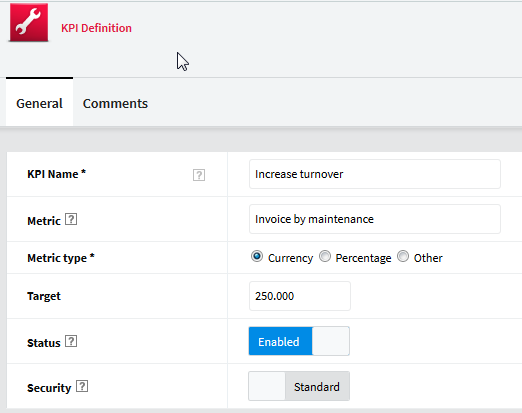
Field | Use |
KPI Name | Define a KPI name which can also be incorporated into a hierarchy. Creating a hierarchy is done by separating levels with '\' (backslash). Example: Savings\Material direct savings. Note that Material Direct Savings is the KPI. Free text. Mandatory. |
Metric | Indicates the measure of performance used. This field is free text and mandatory. The metric name is the one used to define KPI target (target in the project). |
Metric type | Indicates the unit of measurement used, which is displayed in the views. Possible values are: Currency: the metric is a currency. Percentage: the metric is a percentage. Other: free input of a metric of your choice. Mandatory. |
Metric symbol | Visible only when 'Metric type' is 'Other'. Indicates the symbol associated to the metric. Mandatory. Single selection field. The list of possible values comes from the 'KPI Definition' documents already defined. |
Target | The target to be reached for this KPI. Not yet implemented. |
Status | Indicates if the KPI is enabled or not. The input of a KPI target is only possible for enabled KPIs. |
Security | Defines the security that will apply to KPI documents. Standard: access rights for KPI target and KPI tracking documents are defined in the same way as the other project documents. Restricted: only project leaders and substitutes can access the KPI target and KPI tracking documents. |
Comments Rich text field that can include texts, pictures, attached files, etc. |