Define a Project as a Template (v8.xx)
Defining a project as a template is very simple; all you need to do is set its status to "Template".
Open the project description.
Place it in edit mode by clicking "Edit" on the [Action] menu bar.
Change the project status in the in the header of the project description to "Template".
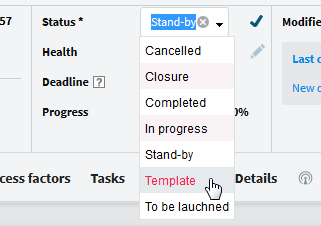
To change the status of a project, click on the pen icon to toggle to edit mode for this field. After changing the value of the field, click on the to confirm your changes. When the status of a project is modified, the data must be propagated to all documents related to the project. The propagation mode depends on the Update of the project documents option on the [Categorization] tab. See this option for more information.


To actually create a real project template there are other points where you need to be aware of, for example if a project is initialized from a template based on a project already executed, assignments to generic resources, etc.